|
Quick Start Guide
Register as a User
Query
Arrangement of Data
Data Entry
Batch Data Loading
Register as a User
Unregistered users have access only to locality numbers and coordinates. They can also use the Map to display locality positions.
Registered users can display full locality data and paleontology/adopted age data that is released, may also enter and submit new data.
Query
Database records can be retrieved using:
- the menu box
- the Simple Query form
- the Advanced Query form
- the Interactive Map
Above the menu at the top left of each FRED page there is a data entry box labelled "Enter FR Num" where a Fossil Record File number or a consecutive range of numbers can be entered: e.g. M25/f1, or M25/f1-10. Fossil record numbers based on the NZMS1 system can also be entered, e.g. N164/f500. After running a query, click on the  icon in the Search Results screen to display a full database record. The components of this record can then be extracted in PDF format for printing. The results can also be downloaded to a tab-delimited text file for transfer to a spreadsheet, or selected records sent to a data entry folder for addition of new Paleontology or Adopted Age data (see below). icon in the Search Results screen to display a full database record. The components of this record can then be extracted in PDF format for printing. The results can also be downloaded to a tab-delimited text file for transfer to a spreadsheet, or selected records sent to a data entry folder for addition of new Paleontology or Adopted Age data (see below).
In the Simple Query form, a further range of search options are available, for example, search using Field Number, Collector Name, Stratigraphic Name, Age, or Taxonomic Name.
The Advanced Query screen provides for searching most fields of database records.
There is a general Help screen for the Interactive Map interface, accessed via the  button at the foot of the left-hand toolbox. The initial Map screen shows the masterfile areas. Zoom in to a region of interest - fossil localities show as blue squares. The easiest way to select a locality or number of localities from the display is to use the rectangle selection tool. Selected localities are highlighted in yellow, and are listed at the bottom of the screen. Click on the FeatureID number to display database information about the associated locality. button at the foot of the left-hand toolbox. The initial Map screen shows the masterfile areas. Zoom in to a region of interest - fossil localities show as blue squares. The easiest way to select a locality or number of localities from the display is to use the rectangle selection tool. Selected localities are highlighted in yellow, and are listed at the bottom of the screen. Click on the FeatureID number to display database information about the associated locality.
Arrangement of Data
Each registered fossil locality has a single database locality record. Recollections have separate records. Currently there are 3 types of locality:
- Outcrop locality records contain location, collection, stratigraphy, sedimentary features, and cross-reference fields. Some locality records at present contain only geographic coordinates.
- Drillhole locality records consist of a header with location and vertical datum fields, and a variable number of attached depth-related sample records. Sample records contain individual sample collection details, stratigraphy, etc.
- Vertical Section locality records (for cliffs, pit faces) also have a header and attached sample records.
Outcrop locality records or Drillhole/Vertical Section sample records may have any number of Paleontology or Adopted Age records attached:
- Paleontology records comprise a header and a variable number of fossil lists.
- The header includes laboratory number and general information about paleontological results: name of paleontologist, date, determined stratigraphic age, and comments.
- Fossil lists consist of a major fossil group name plus a list of taxa. Each taxon may have associated comments.
- Adopted Age records include name of geologist, date, stratigraphic age, and comment fields.
Data Entry
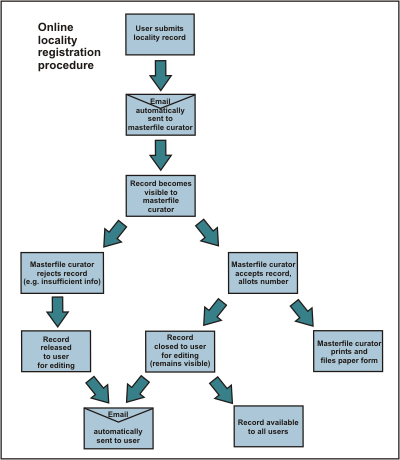
- When you click on the Data entry link on the FRED home page, if you haven't already logged in, you should be shown a screen which asks for your login name and password.
- Once logged in, you are directed to a Folders screen. You need to create a folder to put in new localities. Use the New folder command at the top of the screen (you may need to turn off your browser Pop-up Blocker). Click on the new folder name to display its contents and enter localities. Don't change the folder access (Edit users button on right) unless you want to make it visible to another registered user.
- To create a new locality use the New Outcrop (or Drillhole/Vertical Section) command at the left of the screen.
- In the data entry form, type information into boxes, or use the drop-down lists. Some fields have a builder button
 at the right which assists with complexly formatted data (e.g. grid references). Best to use these builders for a start, although the resulting text can be edited directly in the main window. Fields with red labels are required content before a record can be successfully submitted. at the right which assists with complexly formatted data (e.g. grid references). Best to use these builders for a start, although the resulting text can be edited directly in the main window. Fields with red labels are required content before a record can be successfully submitted.
- When you have entered data in the new locality form, you can save it and return to it later to add or amend data, by clicking on the Edit icon
 at the right of the locality number. While in the data entry form you can Copy from another previously entered locality. You can also attach an image file (e.g. picture of the locality, map, geological diagram). When you are satisfied with what you have recorded, you Submit at the right of the locality number. While in the data entry form you can Copy from another previously entered locality. You can also attach an image file (e.g. picture of the locality, map, geological diagram). When you are satisfied with what you have recorded, you Submit  the locality. the locality.
Submit automatically notifies the curator that a record needs numbering. The curator assigns a number, or sends back a message that something else is needed. Once a locality record is numbered, it will become visible to all registered users of the database, and you will not be able to edit it, although you will still see it in your folder, and can add Paleontology records or Adoption comments (remarks about age, usually added much later).
- Paleontology and Adopted age records can be attached to new or existing database records.
To add paleontology or adopted age data to an existing database record, retrieve the record via a Query, display it by clicking on the page icon at left of the locality number, then use the Add to Folder command at left of the screen (first selecting the intended folder from the pull-down list).
Click on the locality number in the Folder Contents display, then you can add paleo and adopted age records by clicking on the green  or blue or blue  buttons, respectively. While records are being created, before they are submitted and accepted into the database, they are only visible to the user creating them. When these records are submitted, their visibility to other users is controlled by the Security Setting that the user has selected. buttons, respectively. While records are being created, before they are submitted and accepted into the database, they are only visible to the user creating them. When these records are submitted, their visibility to other users is controlled by the Security Setting that the user has selected.
- New taxonomic names, i.e. names not already in the online Thesaurus, need to be approved before a paleontology record is accepted into the database. As part of the submission process, the panel that approves new names for the relevant fossil group is notified by email. Once names are approved, the submission proceeds automatically.
Record indeterminate specimens within a major group as "gen. indet." or, for example "Belemnopsis sp. indet."; informally named taxa "Belemnopsis spp.", "Belemnopsis sp.a" or "gen. A sp. b" are also acceptable.
Batch Data Loading
Registered users of FRED can use a live template for uploading their bulk data directly into the database. This Excel spreadsheet can be obtained from the Data Entry page. We've also provided a static Excel upload template for FRED users who prefer our database managers to upload their information. The template can be filled out and e-mailed for upload to our Collections team. The spreadsheet provides options and examples of the type and format of data accepted
|




 FRED Home
 Simple Query
 Interactive Map
 Quick Start
 Contacts
 FAQ
FAQ Conditions of Use